All it requires is a free app and a commitment to the process
Ever spent hours searching for a screenshot, quote, or post you remember reading and want to reference in your writing?
There is perhaps nothing more frustrating than stopping work mid-flow to locate something out of reach. (Except, of course, not being able to find what you need at all.)
And with the onslaught of information now available at our fingertips, it’s all too easy to get overrun trying to keep up.
But, guess what? You don’t have to settle for information that’s buried beneath piles of stuff you have no immediate use for. Nor do you have to dismiss those jewels you run across simply because you fear not being able to find them again.
Instead of adopting a minimalist mindset with your note-taking, create a system that lets you fearlessly gather as much info as you want.
Build a System You Can Trust
Chances are, you already have some form of a collection system, whether that’s notebooks you keep on your desk, applications you use on your phone, or a more traditional file-folder setup.
The problem with these approaches?
They lack searchability.
I don’t know about you, but I cannot rely on my memory to isolate the exact notebook or folder with the quote I need, or the date I jotted down an idea that’s perfect for a current article.
And even if this approach worked short-term, when the info is still fresh, what happens in a month or a year? Good luck retrieving it when there’s no immediate context.
The better option is a singular place to store it all… And a way to retrieve that information without fail.
For me, that’s Obsidian. With this application, I can link as many notes as I want to guarantee future access.
Evaluate Your Current Process
It may not be easy to look inward and gauge what’s working, but it’s necessary if you are ever going to effect change.
I spent years gathering information in a manner that felt comfortable but, in reality, only hurt my creative efforts.
Folders stuffed with physical files, emails of links I wanted to keep, web browsers and applications like X overrun with bookmarks of items I saved… None of these approaches made a difference when I sat down to write and could not locate those things I’d captured.
Even screenshots, which I could capture quickly and save to my phone, offered little help. More often than not, I’d forget what it was that made them worth keeping by the time I actually got around to reviewing them.
Create an Approach That Works
Here’s a typical day in my world:
In the mornings, I usually spend a little time scrolling through both X and Medium. On both platforms, I run across news, insights, and other information I want to keep for future reference. I also come up with ideas I may later use in my writing.
At this time, I don’t decide when or how I’m going to use this information; I just determine whether to keep it. And once I know this, I use the share feature embedded within the applications to save the info to Obsidian.
It doesn’t matter if it’s a link or image. Both can be imported into my personal vault. I can then choose whether to add the saved info to a note I already have open or a system-generated daily note. When I choose the daily note, I always change the title to reflect the info I’ve captured.
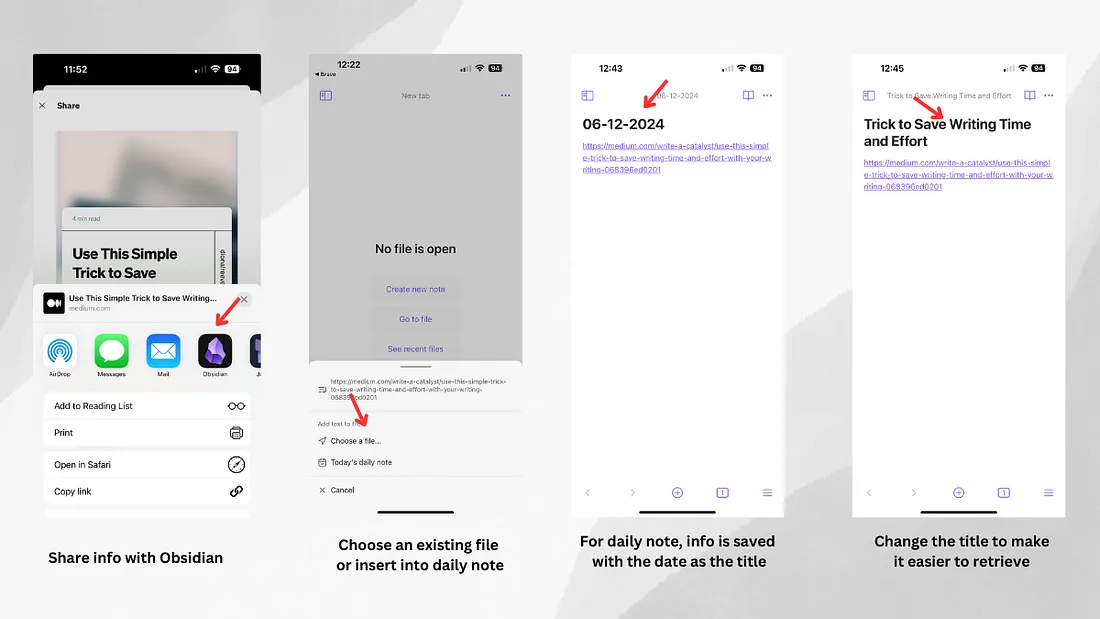
But that’s only half the process, and frankly, something you could do with any note-gathering application.
The key to making this saved material useful?
Linking it to a separate note in which I capture my thoughts on the subject.
When I first started using Obsidian, I’d add my personal thoughts in the same file as the reference material. But doing so is a complete waste of Obsidian’s functionality.
Now, I create stand-alone notes with my thoughts and link to any relevant info. This could be a reference item, another note on a similar topic, or an image file.
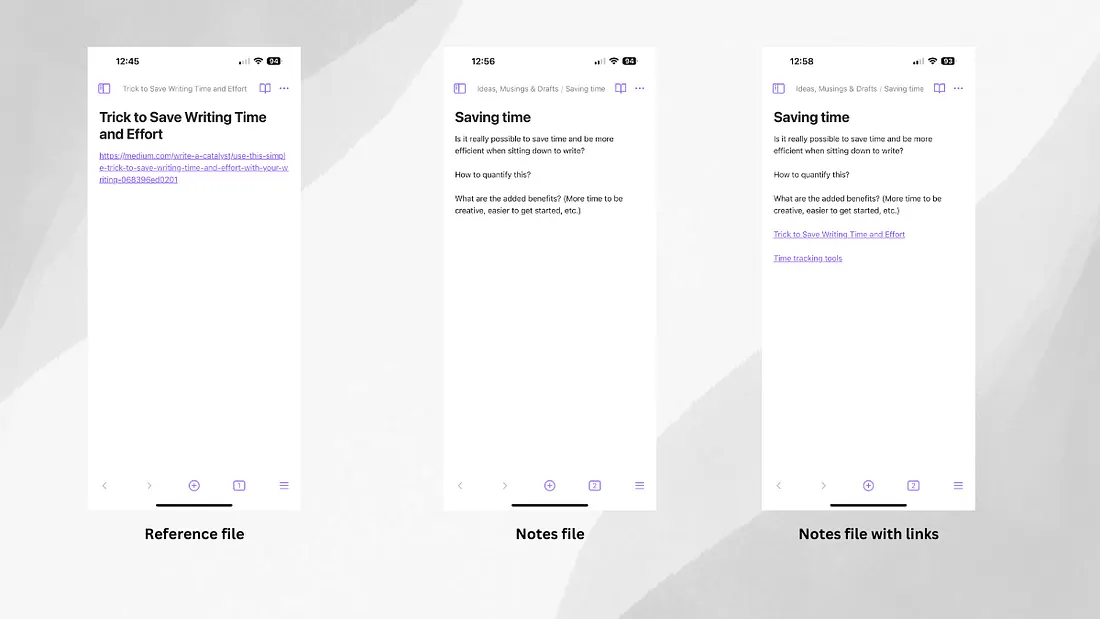
This approach ensures that I can easily find what I’m looking for when I need it, and it does not limit my notes to a single use.
After all, how many times do you repurpose an idea or reuse a resource?
With the reference items isolated from your notes, you create a digital library of sorts… And you can retrieve this information in a variety of ways.
Why not give it a try?
Obsidian is free to use unless you opt for the paid sync option. And just like the other popular applications for gathering notes, there are mobile and desktop versions.
Once you become familiar with the application and have your system in place, try pulling in your old notes while you gather new ones. You’ll be surprised at how easy it is to both capture and locate information.
With a strong information-gathering system in place, you eliminate the fear of losing something valuable along the way. Best of all? Having a tool you trust will inspire you to spend more time writing and less time tracking down those items you’ve captured for future use.
Originally published in Write a Catalyst.